

MFA Without a Smartphone: Why Flip Phones Expose a Bigger Enterprise Security Problem
- 3 hours ago
- 6 min read
A growing number of people are rethinking how much of their daily life they want tied to a smartphone. For some, going back to a flip phone is about focus, privacy, simplicity, or reducing digital distraction.
But for businesses, the flip phone trend raises a bigger cybersecurity question:
What happens to multi-factor authentication when users do not have, cannot use, or do not want to rely on a smartphone?
For many organizations, the smartphone has quietly become the default authentication device. It is used for authenticator apps, push notifications, SMS codes, password resets, and account recovery. The assumption is that a smartphone works until someone loses a phone, changes carriers, travels internationally, works in a restricted environment, refuses to install a company app. But for a growing number of people, there is a proactive choice to move back to a non-smartphone.
The answer should not be to abandon MFA. The answer is to build an MFA program that is flexible, resilient, and appropriate for the workforce.
This is not only a lifestyle issue. It is an identity and access management issue for businesses maturing their cybersecurity capabilities.
For organizations building or maturing their authentication strategy, Socium Security helps businesses design cybersecurity programs that reduce risk, support compliance, and scale with growth.
The Problem: MFA Has Become Too Dependent on Smartphones
Many businesses say they have multi-factor authentication in place, but in practice, their MFA strategy often depends on mobile apps or text messages.
That creates challenges for employees without smartphones, frontline workers without corporate smartphones, executives and privileged users, contractors who may not want to install company apps on personal devices, and employees in environments where phones are limited or not allowed.
For mid-market companies and middle America, this issue is especially important. Manufacturers, logistics companies, rural healthcare providers, family-owned suppliers, construction firms, and local service businesses are increasingly being asked to meet Fortune 100 security expectations.
Their customers, insurers, investors, and auditors may expect MFA, EDR, SSO, conditional access, cyber insurance controls, SOC 2 readiness, vendor questionnaires, and formal security governance.
But the workforce may not look like a corporate office environment. Many users are not desk-based. Many do not use corporate smartphones. Some have limited connectivity. Others are highly capable in their roles but do not want their personal device turned into an enterprise security endpoint.
That is not user resistance.
That is a design constraint.
A mature MFA program should not collapse because the organization assumed every user would have the same device, the same technical comfort level, and the same willingness to install authentication software on a personal phone.
Is SMS MFA Good Enough for Users Without a Smartphone?
Users without a smartphone can still receive SMS codes, so SMS-based MFA may seem like the easiest answer.
And to be clear, SMS MFA is usually better than having no MFA at all.
However, SMS should not be the primary authentication method for critical accounts. Text-based
MFA can be exposed to SIM swapping, number porting, phishing, and social engineering. If an attacker can take over the phone number or trick a user into sharing a one-time code, SMS MFA may not provide the level of protection the organization expects.
This matters most for high-risk accounts, including email, password managers, cloud platforms, financial systems, administrator accounts, HR and payroll systems, customer data platforms, and remote access tools.
For these accounts, organizations should look beyond SMS and move toward stronger authentication methods. CISA recommends that businesses aim for phishing-resistant MFA, and NIST’s Digital Identity Guidelines ( NIST SP 800-63) continue to serve as a key reference point for authentication assurance and digital identity risk management.
The Best MFA Option Without a Smartphone: Hardware Security Keys
For users moving away from smartphones, one of the strongest MFA alternatives is a hardware security key.
A hardware security key is a physical device used to verify identity during login. It can often plug into a laptop or connect through USB, NFC, or other supported methods. Unlike SMS codes or push notifications, security keys can support phishing-resistant authentication when properly implemented.
For someone without a smartphone, the practical approach is simple: buy two hardware security keys, register both with important accounts, use one as the everyday key, and store the second one securely as a backup. Recovery codes should also be saved offline in a secure location.
Security keys can be especially useful for email, password managers, cloud services, developer platforms, and business applications that support FIDO2 or WebAuthn.
For businesses, this is not only a user convenience issue. It is a security maturity issue. Organizations should consider hardware security keys for executives, privileged administrators, finance teams, HR users, IT administrators, and other high-risk roles.
A cybersecurity maturity assessment can help determine whether MFA controls are properly aligned to workforce needs, privileged access, compliance expectations, and business risk.
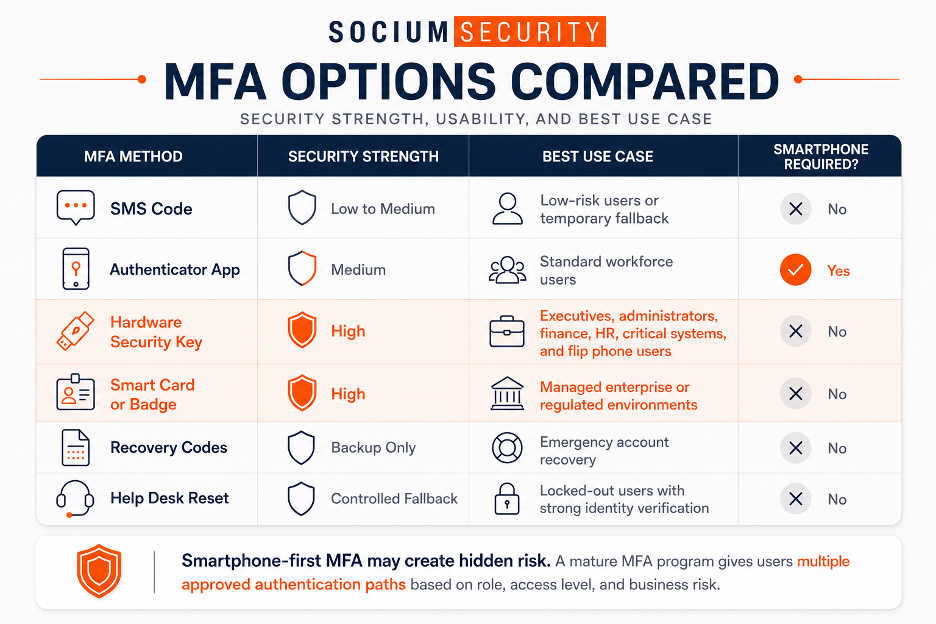
MFA Should Be Risk-Based, Not Phone-Based
The bigger lesson is this:
MFA should not be a smartphone dependency. It should be a risk-based identity control.
Not every account requires the same level of protection. A low-risk application may have different requirements than an administrator account with access to sensitive systems. The goal is to match the MFA method to the risk of the user, system, and data involved.
A stronger MFA strategy gives users secure options without weakening the control environment. That may include hardware security keys for high-risk users, authenticator apps where appropriate, platform credentials in managed environments, smart cards for certain workforces, conditional access policies, secure backup methods, strong help desk identity verification, and limited use of SMS only where the risk is understood and accepted.
The future of MFA is not “everyone must use an app.”
The future is risk-based authentication with multiple approved paths.
Smartphone-First MFA Creates Hidden Business Risk
When a company requires employees to use personal smartphones for MFA, it may unintentionally create privacy, equity, operational resilience, and adoption issues.
It also creates unmanaged dependencies on employee-owned devices, personal phone numbers, app stores, mobile operating system versions, carrier availability, international travel conditions, and help desk reset processes.
That is a lot of hidden risk for what many companies treat as a checkbox control.
This is where many organizations confuse MFA coverage with MFA maturity.
MFA coverage means the organization has turned MFA on.
MFA maturity means authentication is secure, supportable, recoverable, workforce-appropriate, and aligned to business risk.
For organizations that need ongoing support, managed cybersecurity services can help maintain stronger authentication, monitoring, compliance, and security operations over time.
What to Do Before Switching to Life without a Smartphone
Before moving away from a smartphone, users should prepare their most important accounts.
Use this checklist before making the switch:
Make a list of critical personal and business accounts.
Check which MFA methods each account supports.
Add hardware security keys wherever possible.
Register more than one MFA method.
Save recovery codes in a secure offline location.
Avoid relying only on SMS for critical accounts.
Add a carrier PIN or port-out protection to reduce SIM swap risk.
Confirm how account recovery works if the phone or security key is lost.
Test login from a laptop or desktop before retiring the smartphone.
The most important step is testing. Do not assume an account will work without a smartphone. Verify that you can log in, recover access, and manage MFA before making the switch.
What Organizations Should Learn from the Without a Smartphone Trend
The smartphone question exposes a broader enterprise issue: many organizations have designed MFA programs around personal smartphones instead of designing them around workforce reality and business risk.
Organizations should ask whether they require employees to use personal smartphones for MFA, whether high-risk users have phishing-resistant authentication, whether privileged users still rely on SMS, whether frontline and seasonal workers have practical authentication options, and whether the help desk can securely handle MFA resets.
If the answer to these questions is unclear, the organization may have MFA coverage, but not MFA maturity.
This is also a security culture issue. For less tech-oriented users, security programs often fail because they feel punitive, invasive, or impractical. A flip-phone-friendly MFA strategy sends a better message: we can protect the business without forcing every employee into the same technology pattern.
For companies that need stronger visibility, better control execution, and ongoing monitoring, security operations support can help connect authentication strategy with broader cyber resilience.
Final Thought: Going Back to a Life Without a Smartphone Does Not Mean Going Backward on Security
Going back to life without a smartphone may reduce digital noise, but it should not reduce account security.
With the right preparation, users can move away from smartphones while still using strong authentication. For organizations, the lesson is bigger.
A strong MFA program should be flexible, resilient, and secure by design. It should support users who cannot or do not want to rely on smartphones. It should prioritize phishing-resistant MFA for high-risk accounts. It should account for frontline workers, contractors, executives, administrators, and distributed teams. And it should treat authentication as a core part of cybersecurity risk management.
MFA is not just a checkbox. It is one of the most important controls protecting business systems, customer data, financial operations, and operational resilience.
The question is no longer simply, “Do we have MFA?”
The better question is:
Do we have MFA coverage, or do we have MFA maturity?
If your organization is unsure whether its MFA strategy is strong enough, contact Socium Security to assess your identity controls, strengthen authentication, and build a cybersecurity program that scales with your business.


